

Going along with our PoS pop-up event, here’s a simple tutorial on how eligible users can register for the $PI airdrop! Also, here’s a reminder that there is a registration period for the airdrop! The period is before 2/26 23:59 (GMT+9), so be sure to register before it ends.
Important: Those that do not register before that time will NOT be able to claim their airdrop.
Also, remember to connect using the wallet that you participated in PoS Staking with! Or else we won’t be able to verify whether you are eligible or not.
Tutorial
Here’s a simple guide on how to register! We have provided the user-friendly flow for both registering through our page link and through TT-Wallet.
Registration Through Link

Step 1: Head to our link registration page here
Step 2: Connect wallet
Step 3: Enter your PI network address
Step 4: Confirm
Step 5: Check for the “Registered” tag and you’re set!
Registration Through TT Wallet
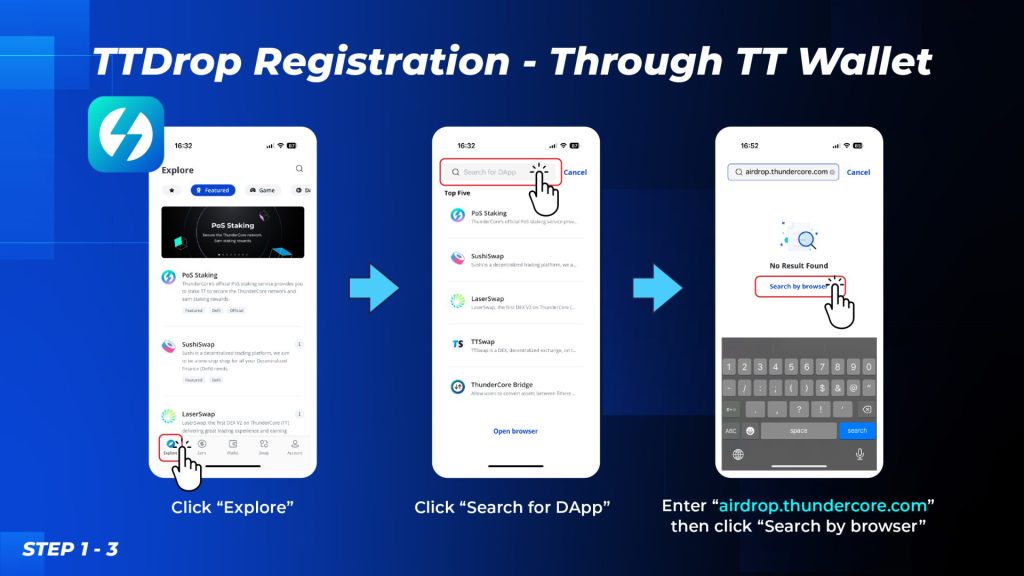
Step 1: Head to “Explore” in TT Wallet APP
Step 2: Click “Search for DApp”
Step 3: Enter the link “airdrop.thundercore.com” then click “Search by browser”
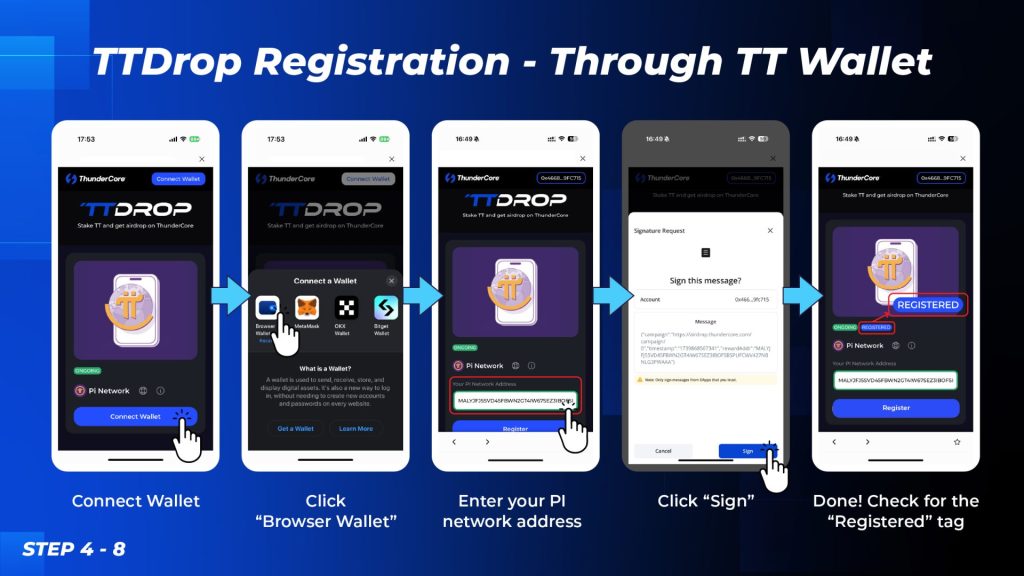
Step 4: Connect wallet
Step 5: Click “Browser Wallet”
Step 6: Enter your PI network address
Step 7: Sign!
Step 8: Check for the “Registered” tag and you’re set!
Why Do We Need to Register?
The registration is to ensure we have the PI address for eligible users so we can safely do the airdrop. It’s also a way for us to ensure the legitimacy of the eligible users to keep the airdrop event safe and fair!
What’s Next?
Our community stands at the forefront of what we value and this pop-up event is one of our ways of rewarding the community! We have more interesting things planned for the future so keep an eye out!

ThunderCore Official