
Due to recent regulatory development, the team has decided to begin transitioning towards removing TT Wallet from Apple App Store and Google Play Store. This is a proactive step towards aligning with potential future developments as we re-evaluate our next steps in navigating new regulations and requirements. We want to stop the inflow of new users into the App; existing users will still be able to utilize their already downloaded TT Wallet App as-is but the app will not receive further updates. For what we have planned, we believe that taking a more proactive approach will be paramount and this step will be necessary.
Expected Removal Date: 2025/7/31 5:00 UTC+0
As we transition away from TT Wallet, users will retain full control over their assets; we encourage all users to take necessary steps to safeguard their assets moving forward. For more information on how to safeguard your assets, continue reading!
You can also reach out to our User Support for further assistance.
Safeguarding Your Assets
Exporting and Importing Private Key

TT Wallet currently has the function to export your private key! This function highlights safety as it allows for users to have full control over their assets, and they are free to import this key into other Web3 Wallets such as Bitget Wallet, Trust Wallet, and MetaMask.
Please note that once you’ve exported your key, the account will not be usable on TT Wallet again!
For an even more detailed guide on exporting and importing your private key, read Here.
Filling Recovery Information
Filling out your recovery information is vital to protecting your assets! Once the TT Wallet App has been removed from App Store and Google Play Store, you won’t be able to redownload it. Already downloaded Apps can still be used, but remember to protect your assets and information in case the App gets deleted. Here’s a simple guide on how to fill in relevant information to protect your assets.
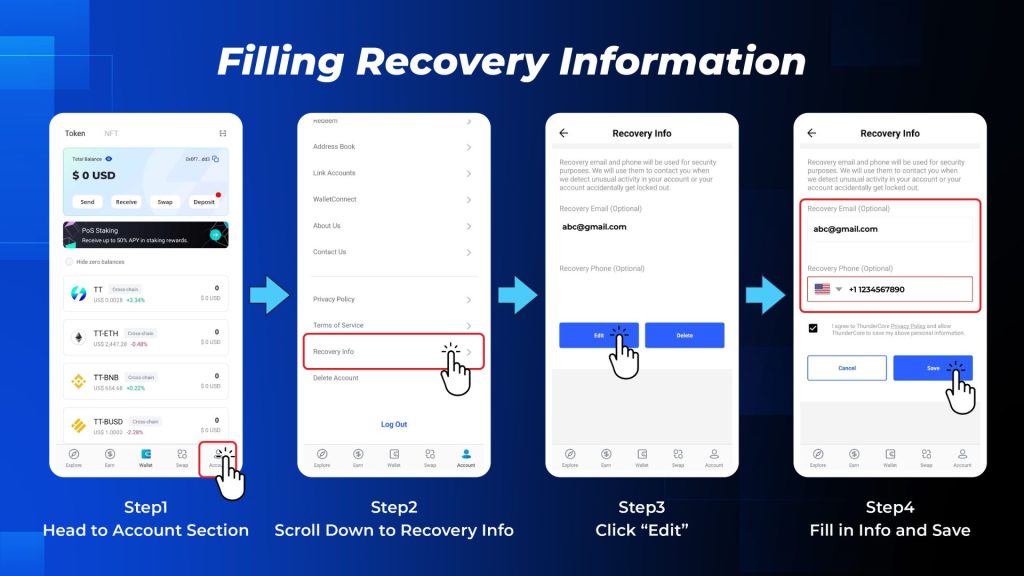
Step 1: Head to Account Section
Step 2: Scroll Down to Recovery Info
Step 3: Click Edit
Step 4: Fill in Info and Save
Other Information
Exporting and importing your private key to other Web3 Wallets does not mean giving control over your key to these wallets! You have control over your own key and importing it into another wallet does not mean relinquishing that control. As long as you keep your key safe, your assets will be safe!
PoS Staking will also not be affected by exporting your key or by app removal from App Store and Google Play. Removal of the app or exporting your key does not affect PoS Staking! Go here after importing private key into another Web3 wallet to see PoS Staking-related details!
Further User Support
We will have user support throughout this entire process! For further assistance, feel free to reach out to us via our User Support.
What’s Next
As we continue our journey, we believe that maintaining flexibility in the face of new development is crucial. Our Guides and User Support will help users through every step of this transition. We also highly recommend users to export their private key to partner wallets like Bitget Wallet, Trust Wallet, or MetaMask! We believe that this next step for TT Wallet will help us establish a tighter hold on reaching our goals and working towards that dream of general adoption that we all have!

ThunderCore Official